Category: sales reps

  • Identifying and Addressing Ghosting On-the-Job by Employees Cell Phone Usage Patterns

    Identifying and Addressing Ghosting On-the-Job by Employees Cell Phone Usage Patterns

    Are you grappling with the challenge of employees ghosting, where their mobile phone usage for work becomes a blind spot? This is no longer a “new phenomenon”, especially with remote, or Out-of-office working modalities becoming the norm. How would you know what employees are really doing and whether or not they are performing their tasks when they are working remotely using their cell phones? How would you do that without invading their personal privacy?

    Among its many benefits, Mobile2CRM helps businesses overcome this issue while respecting user privacy.

    Ghosting, the lack of visibility into employee mobile phone usage, can create communication gaps and missed opportunities. With Mobile2CRM, we offer a solution to bridge this gap and improve your understanding of employee activities.

    Mobile2CRM utilizes advanced algorithms to analyze mobile usage patterns, call durations, and communication metadata. By harnessing this data, Mobile2CRM provides insights to help you identify communication bottlenecks, optimize workflows, and uncover potential growth opportunities.

    At Mobile2CRM, we understand the significance of privacy. Our platform adheres to stringent privacy regulations, ensuring that all data is anonymized and encrypted. We prioritize maintaining the privacy boundaries of both employers and employees.

    Key benefits of Mobile2CRM:

    🔒 Enhanced Visibility: Gain a clearer understanding of employee mobile phone usage for work-related activities.
    🔎 Actionable Insights: Analyze mobile usage patterns, call durations, and communication metadata to uncover valuable insights.
    📊 Improved Productivity: Identify areas for improvement, streamline workflows, and maximize productivity.
    🚀 Privacy Protection: Implement robust security measures to safeguard personal information and ensure data privacy.

    Interested in addressing ghosting and unlocking the potential of your workforce? Just contact us and we’ll take it from there together.

  • Insurance Brokerage, Digital Transformation and Cell Phones – the Winning Combination for 2023

    Insurance Brokerage, Digital Transformation and Cell Phones – the Winning Combination for 2023

    Increasing competition from online insurance providers and direct-to-consumer sales is one of the biggest challenges facing insurance agencies and brokers in the US for quite some time now. With the rise of digital transformation and the increasing ease of accessing information online, many consumers are turning to online insurance providers to purchase insurance policies rather than going through traditional agents.

    This trend is particularly prevalent among younger generations, who are more likely to do their own research and prefer the convenience of online purchasing. As a result, traditional insurance agents may face greater difficulty in attracting and retaining customers, particularly in the personal P&C lines market.

    Another challenge facing insurance agents is the increasing complexity of insurance products and regulations. Insurance products can be difficult to understand for the average consumer, and it can be challenging for agents to communicate the benefits and costs of various policies effectively. In addition, changes in insurance regulations can create confusion and uncertainty for agents as well as for their clients.

    Here are 5 tips on how cell phone use can help insurance agents be successful vs online insurance providers

    Cell phone use can be an important tool for insurance agents to connect with customers and gain the upper hand in competing with online insurance providers. Here are a few ways that cell phone use can help insurance agents be successful:

    1. Mobile apps: Many insurance companies now offer mobile apps that allow customers to manage their policies and make payments on their cell phones. Insurance agents can use these apps to stay in touch with their clients, answer questions, and provide personalized support.
    2. Text messaging: Insurance agents can use text messaging to communicate with customers and keep them updated on policy changes or renewal deadlines. Text messaging can be a convenient and effective way to stay in touch with clients and provide personalized support. The same of course holds true for newer communications platforms and channels such as WhatsApp.
    3. Mobile-friendly websites: Insurance agents should ensure that their websites are mobile-friendly and optimized for viewing on cell phones. A well-designed mobile website can help agents attract and retain customers who prefer to use their cell phones for online transactions.
    4. Social media: Insurance agents can use social media platforms like Facebook, Twitter, and LinkedIn to connect with potential customers and promote their services. Social media can be a powerful tool for building relationships and establishing trust with clients.
    5. Video conferencing: With the rise of remote work and virtual meetings, video conferencing has become a popular way for insurance agents to connect with clients. Agents can use cell phones and other mobile devices to host virtual meetings with clients and provide personalized support from anywhere.

    By embracing cell phone use and leveraging the latest technologies, insurance agents can gain the upper hand in competing with online insurance providers and provide a superior customer experience for their clients.

    Moreover, digital transformation and unified communication solutions such as Microsoft Teams, Mobile2CRM and a growing number of AMS’s/CRMs that integrate with them further contribute to the seamless integration of cellular communications into the Insurance brokerage tech eco-system, and makes this winning combination vision a tangible reality.

  • Incoming ! WhatsApp Regulation

    Incoming ! WhatsApp Regulation

    Whatsapp has taken the world by storm, with over 1.5 billion active users it has managed to revolutionize instant messaging for many. This accessibility of communication is changing the way people communicate, the speed at which people respond to one another, and consecutively the demands from the service providers that cater to this new generation.

    Businesses are on a never-ending quest to seek out the ultimate customer experience for their clients. This means innovation in every aspect of the customer journey both in terms of the usage of the business’s service and in terms of customer service and interactions with the client. Furthermore, from a sales aspect, the customers are far more likely to interact positively with the business when are contacted via their preferred communication channels.

    As we established, Whatsapp is becoming a standard for many in terms of their go-to communication channel, driving businesses to establish their own Whatsapp entities to allow better touch points with potential and current clients.

    These can then be used to establish a far more personal relationship than what was possible before, communicating with clients on the platform they use for everyday communication. This, of course, has its pros and cons yet overall it seems that the younger generation has been found to enjoy the seamlessness of using a native communication system far more than the breach they feel in their privacy. This has been evident by the number of businesses citing Whatsapp usage as a driving factor in their increase in sales and improvement in customer experience. (a study that supports…)

    As with many innovations (especially the successful ones), the market adapts to these innovations faster than the regulator and it often takes time for the regulator to catch up with the technology and refer to it with new regulations.

    WhatsApp’s abilities that allow financial institutions to become far more easily accessible for their customers explain why Whatsapp has become such an integral tool in the FinServ toolkit. Yet one of the most compelling advantages to Whatsapp is also the reasoning behind its regulatory pitfall – Encryption.

    Whatsapp is one of the only messaging services that allows for end-to-end encryption, coupled with the fact that Whatsapp is directly linked to a specific number makes for a highly secure service. So why is this a problem?

    To comply with SEC regulations, financial services must document all interactions with the customers, be it voice, text, WhatsApp etc. into a documentation system. This means that Whatsapp communication must also be included in the interactions that are documented between the clients and the financial service provider.

    The Securities and Exchange Commission (SEC) released guidance on the use of social media in securities offerings. The main focus of this guidance was to warn companies about potential violations of federal securities law when using social media to disseminate information to customers. At the time, many observers noted that the SEC’s guidance didn’t specifically mention WhatsApp, but it was clear that the agency would take a dim view of any company that used the messaging app to communicate with customers in an unauthorized manner.

    Yet this hasn’t deterred several prominent Financial Institutions form turning a blind eye towards their employee usage of Whatsapp and even encouraging it since it benefited the company’s customer experience as we have covered – making financial services more accessible than ever before.

    These institutions have begun receiving $200m fines for permitting and encouraging the unregulated use of Whatsapp. It is now obvious that the SEC is intent on dealing with this regulatory blind spot seriously and will crack down on any who decides not to comply with the regulatory demands regarding proper WhatsApp documentation.

    However, there are strong limitations that make this far more difficult to execute compared to regular customer interactions – the use of personal WhatsApp. This means that to document the relevant interactions the company must document all of the employee’s personal WhatsApp thus violating employee privacy.

    As it is now obvious that there is no parting from using Whatsapp as a key communication channel in the financial services sector many businesses now face the challenge of trying to comply with the demands of the SEC in an attempt to avoid high fines.

    Although the technological challenge is clear there are several methods by which businesses can document Whatsapp interactions with clients and comply with the regulation. Stay tuned for our next segment regarding the recommended methods by which this is possible.

    So, the question remains, how are we to answer this challenge. It is obviously compelling to utilize the advantages offered by WhatsApp in its business application yet can we overcome the technical difficulties that arise when complying with regulatory demands?

  • How To Stop Losing Leads

    How To Stop Losing Leads

    Generating leads can be expensive. Generating leads without effectively tracking and monitoring how they are handled and processed – is practically throwing money away…

    If sales representatives are not monitored and managed effectively, leads can quickly be lost. For example, a sales rep might promise to follow up with a potential customer, but then forget to do so. Or, a sales rep might contact a lead but then fail to provide adequate information about the product or service. In either case, the result is the same: the customer is no longer interested in doing business with the company. To avoid this problem, businesses must ensure that their sales reps are properly trained and monitored. By doing so, they can rest assured that their customer leads are properly handled and that new sales will be generated.

    How to monitor your sales reps

    If you want to ensure that your sales reps are handling leads effectively, and having a good chance of meeting their quotas, it’s important to gain visibility into their performance. One way to do this is to record their sales calls. This will give you an idea of how they’re interacting with potential customers and whether they’re using the most effective sales techniques. You can also use call recording to listen for any red flags that may indicate that a rep is struggling, or that you messaging and value proposition requires updates or modification. For example, if you notice that a rep is frequently putting callers on hold or making excuses for why they haven’t been able to close a deal, it may be time to have a conversation with them about their performance. By monitoring your sales reps closely, you can help ensure that your team is meeting its full potential.

    The benefits of having an effective sales monitoring process

    In any business, monitoring sales is crucial to success. By tracking sales data, businesses can identify patterns and trends, which can in turn be used to make informed decisions about everything from inventory levels to marketing strategies. An effective sales monitoring process can also help to identify opportunities and potential problems early on, giving businesses the chance to address them before they have a major impact. Sales monitoring can be a complex and time-consuming task, but the benefits more than justify the effort. When done properly, it provides an invaluable source of information that can be used to improve every aspect of a business. As a result, businesses that fail to monitor their sales effectively are at a distinct disadvantage.

    Tips on how to improve your company’s sales monitoring process

    There are several steps that companies can take to improve their sales monitoring process. One of the most important is to ensure that all call recordings are properly archived. This will allow managers to review call transcripts to identify areas where sales representatives could improve their performance. Additionally, it is important to archive all text (and yes – WhatsApp too!) communications between sales representatives and potential customers. This will provide a written record of the sales process which can be used for training and development purposes. Lastly, companies should consider implementing a formal feedback system in which managers can provide employees with constructive input on their sales techniques. By taking these steps, companies can significantly improve their sales monitoring process.

    While it may be difficult to keep an eye on every sales representative, the benefits of having a strong monitoring process in place are too great to ignore. At Mobile2CRM, we understand this and have created a solution that helps businesses of all sizes track their sales reps’ activity and performance. If you’re interested in learning more about our solution or want help implementing a sales monitoring process in your company, contact us today. We would be happy to help!

  • The Top Three Company Phone Systems in 2022

    The Top Three Company Phone Systems in 2022

    The Top Three Company Phone Systems in 2022 – Quick Recap

    There are many operational essentials when it comes to effectively running a business and communicating with customers or clients, as well as with partners. Not only do businesses now need to ensure that communication is efficient and easily tracked (including cellular communication of course), but they also need to make sure information is stored securely and in a way that makes it accessible. For this reason, both CRM systems and effective company phone systems are absolutely critical parts of day-to-day operations.

    The difficulty comes in choosing which systems are right for your business and which cover all of the features you need. We’ve taken some time to look at the options and chosen a winner (and a couple of runners-up) to help you choose The Best Company Phone System for your business.

    The Importance of Seeing the Full Picture

    There are lots of key touchpoints with customers. Calls, emails, and even texts or WhatsApp messages. For businesses, it’s incredibly important that they can see the full picture to be able to ensure service quality, streamlined and efficient operations, correctly update CRM and other systems, and have a full log and documentation should any issues arise in the future.

    The main problem that modern businesses face is consistency. Tracking calls on phones in an office is simple enough, but what happens when your teams are frequently using their cell phones when working remotely, or on the road? 

    We are working in an evolved and very often hybrid business environment where many more scenarios need to be considered to form a complete, 360-degree view of the business. 

    Before Covid-19, fewer than 1 in 5 employees were working remotely. This number is now expected to be in the region of 70% in the category of employees who can work from home or other remote locations. For this reason, cell phones are being relied on more than ever.

    For a business, it’s important to be able to monitor this mobile information in the same way you might monitor calls in the office. It allows you to see the full picture and is critical to ensuring a smooth experience for customers and a CRM system that is completely up-to-date. 

    Access to up-to-date information, for modern sales and support teams, is invaluable. An account or case is no longer expected to have a single account manager. Large teams need access to information from wherever they might be, and connecting mobile devices to the company’s CRM and other systems is critical to the success of this.

    Should A Business Provide Employees with Mobiles?

    When it comes to “work phones” businesses have a few options available to them, and it is the responsibility of business leaders to find a balance that works for both resources and budgets and core operational needs.

    Companies can provide employees with company-owned cell phones, or rely on a BYOD (bring your own device) system, where workers are using their own cell phones. Which is better might depend on the size of your team or how regularly they are expecting to use these devices.

    Some companies choose to reimburse their employees for the cost of these devices but for smaller businesses with more limited resources, the priority will likely be ensuring that the devices are secure.

    Why Employee Privacy Is Important

    Businesses must be able to monitor activity without impeding on employee privacy. A good system will allow the separation of personal and work usage.

    It’s not really a surprise that employees want to keep their work and personal communications separate. Trusting employees and ensuring that they feel trusted is very important for maintaining ethics, morale and keeping good employees engaged with the practices of your business.

    In a 2020 survey, 57% of respondents stated that smartphones were the most vulnerable endpoint of their organization. It’s a communication channel that simply cannot be ignored, but getting that balance right is incredibly important.

    So Which are the Top Three Company Phone Systems for 2022?

    Now, for the most important part – the best phone system for your business.

    1. Our Winner: Microsoft Teams

    Our winner is Microsoft Teams and, more specifically, Teams partnered with Mobile2Teams™. To those researching the best options for company phones the possibilities with this option are really very intriguing and the software is extremely powerful.

    Many businesses are already using the Microsoft Office Suite and Teams for basic external and internal communications, but its functionality expands much further than simple chat, conferencing and admin functions.

    As a standalone product, it does an excellent job for calls and messages, but when partnered with Mobile2Teams™, the end result is a much more comprehensive organizational communication envelope, that also caters for mobile cellular network-native voice, text and WhatsApp communications – not the techno-compromise of using VOIP.

    Key Features:

    • CRM Integration – Capturing voice, text (SMS) and WhatsApp communications securely in your chosen system
    • Call Recording for voice, text and WhatsApp communications
    • Transcription – Teams and cellular voice call transcription for improved information quality
    • Click to Call – Business calling and texting directly from your selected CRM mobile apps
    • Intelligence – Integration with call analytics systems for a better overview of data
    • Cellular Calling – Cellular mobile calling using the Microsoft Teams number, (protecting personal employee information)
    • Extra numbers – Multiple phone numbers per individual user
    • Number porting – Keep the same geographical numbers wherever you are working from

    The real strength of this option lies in the fact that so many businesses already have and use it. The expansion of its functionality with Mobile2Teams makes it a very flexible option for businesses of pretty much all sizes.

    Major distinction – cellular native solution – not mobile VoIP

    You can find out more about Mobile2Teams™ here.

    1. RingCentral

    Our first runner-up is one of the most popular business communication systems. It has established itself as one of the leading services on the market.

    RingCentral will integrate with the likes of Google, Oracle and Salesforce and offer users varying (tiered) features.

    At a basic level, it offers effective call management, useful admin tools and a fairly flexible API making it great for businesses with internal development teams and a need to adapt the program to fit their needs.

    The tiered rollout means that those really getting the most from the system will be medium and large businesses with the feature-heavy tiers not really being the best fit for small teams.

    Key Features:

    • Comprehensive contact center capabilities
    • CRM Integrations – Connect vital mobile data with Salesforce, Zendesk, and other key operational systems
    • Call Recording – Making it possible to accurately investigate issues or disputes
    • User-Friendly Interface – A good option for businesses that have employees with varying technical abilities
    • App Calling – Making it easy to access the system on the go whilst protecting employees’ personal cell details
    • Voicemail and Greetings Features – Providing a seamless experience for customers

    Distinct drawback – US mostly

    1. DialPad

    DialPad might be familiar to those who have used the conferencing software system, UberConference. DialPad is their VoIP alternative and is a fairly strong option for communications monitoring.

    Just as with the other systems, DialPad is compatible with a number of providers, Google and Microsoft to name a couple.

    Unlike RingCentral, the lower tiers offer slightly more for smaller businesses although they don’t expand at the higher levels to the same degree as those in first and second place on our list.

    Key Features:

    • Comprehensive contact center capabilities
    • Company Number Use – Protects employees personal data
    • Data backup – Protects essential data in the event of program failure
    • Cloud-based System – Ensures mobility and ease of use
    • API – Allows companies to mold the technology to fit existing systems

    Distinct drawbacks – US mostly, VoIP technology

    Setting up Your Company Phone System

    With our basic round-up complete, it’s time to discuss how you can go about implementing our #1 recommended system, Microsoft Teams.

    Mobile2CRM helps businesses to capture cell phone interactions without compromising employee privacy. The system prioritizes compliance and capture and helps businesses create systems that work for them.

    Request a demo and find out how the system can work for you. You will get an opportunity to ask our experts about any special requirements or specific questions and begin accurately and securely monitoring your business’s communications.

  • Employee Privacy

    Employee Privacy

    Do you still have an extra business Cell phone in 2022?

    As businesses moves away from landlines and embrace cell phones, the way we conduct business communications is changing. A recent study found that about 60% of business calls are made using cell phones. This number is only going to continue to grow in the years ahead. There are a number of reasons for this trend, but one of the most important is that cell phones allow us to be more mobile and flexible in our work. However, with this flexibility comes a new set of challenges. One of the most significant challenges is how to capture business calls and at the same time respect employee privacy.


    There are several solutions on the market that purport to address this challenge, but most of them are either too demanding on employees (and thus less effective) or too restrictive for customers. Neither of these options is ideal. What we need is a solution to the issue businesses face today – how to capture business calls without infringing on employee privacy. In this blog post, we will discuss several solutions to this problem.

    To understand the rationality behind this problem we must first understand why this is in fact a problem. The answer lies in the business methodology that has been used since we developed the ability to record and log customer interactions.

    As with any process and particularly in business, efficiency is often closely related to the effectiveness of the management and revision of a particular process that is being done.

    Therefore, it is of the utmost importance to enable customer-facing employees the ability to record and log interactions with the company’s customers, allowing for the revision and streamlining of the process and insights into the business customers’ set of needs and preferences.

    Today, with privacy being of increasing concern for individuals everywhere there is a reluctance to allow organizations the freedom to access and listen to personal interactions. This is due in part to the recent media coverage of companies like Facebook who have been caught mishandling user data.

    As a result, business calls are now often made using cell phones rather than landlines. This poses a new challenge for businesses – how to capture business calls without infringing on employee privacy.

    There are a few ways to tackle this problem. Varying from Voice over IP to SIM-based solutions that allow employees various degrees of control over the recording of their conversations with clients. This is then logged into the company database for future access – at the employees discretion. The advanced solutions allow for CRM integration and intricate use of the data that was logged for further analysis and investigation.

    The decision of which solution to use will come down to the business’s needs and the level of privacy that employees are comfortable with.

    Mobile2CRM offers a great example of the complete solution that allows for the integration of the interactions logged – turning them into meaningful business insights for your business – all while looking out for your employee’s privacy! We hope this blog post has shed some light on the issue of how to capture business calls while respecting employee privacy.

  • Top CRM Integration

    Top CRM Integration

    CRM Integration Insights

    If you’re like most business owners, you rely on a CRM to manage your customer relationships. But did you know that there are many powerful CRM add-ons available that can help you do more with your data? In this blog post, we will take a look at the top CRM integrations and what they can do for your business. We’ll also discuss the need for CRM integration with other systems and communications channels and how it can help you boost your sales and productivity.

    Most disciplines within an organization have their own software used to fulfill their part in the company. This oftentimes creates a difficult situation where different parts of the company work independently and not in a positive manner. This diversity in software tools can create a siloed working environment for the different parts of the company, resulting in unshared information, unproductive work, and unsynchronized divisions within the company.

    A CRM system reaches its full potential when it’s connected with other applications and software, thus enabling a mutual benefit for both the CRM and the other systems that operate off of the customer data in the CRM.

    These systems might be unrelated to the CRM system, but the data they generate or use can make CRM work better, and vice versa.

    The integration will look quite different for various types of businesses. For some, it’s as simple as linking a CRM system with a few functions of a company website. However, more complex businesses will need to integrate a CRM platform with a variety of other systems, including ones that are equally or more complex.

    So, Let’s dive deeper into the types of integration available.

    Marketing Integration –

    The marketing process consists various processes that over time amount to the creation of a funnel for the sales team. These processes often use various software and databases to streamline and automate the engagement with potential leads. Therefore, creating a need for a central and organized system that brings all the various pieces together – CRM – most marketing software can integrate with multiple CRMs since it has become a popular demand by marketers.

    Sales Integration-

    Sales are done by several different channels and methods within companies and are often accompanied by various tools such as – Zoominfo’s Engage, Outreach, and even your sales reps’ cell phones. These tools must connect to your CRM due to the fundamentality of your CRM system as the basis for your sales foundation. The CRM enables the tracking and analysis of what is done by your sales team at all times and allows for intelligent decision-making and a birds-ey view into the inner working of your sales team.

    Social Media Integration

    Social media has long become an integral part of every marketing strategy, this in effect is driving the increase in solutions that enable smarter and easier management of social media channels. Furthermore, the leads created on social media are often very high-quality leads with high conversion rates. Therefore, marketing teams must track and log these leads into the company system so that they can be utilized by the sales team and pushed further down the pipeline. This is oftentimes easier due to human errors that lead to losing high-quality leads. Therefore, integrations between social media management tools and CRM is crucial to driving the effectiveness of the social media pipeline.

    Customer Success

    Perhaps the most obvious of all integrations since it is the root of the CRM tree – customer success. Tools such as – pipefy, slack, monday sales, etc. all enable advanced tools for enhancing the customer success experience on both ends – both the customer and the employee. The ability to stack these capabilities onto your best customer success tool -CRM- allows for higher customer satisfaction and better customer experience.

    So, as you can tell there are many different integration available that can greatly benefit your business especially in the automation and process streamlining aspects. The main aspect that all these integrations have in common is the ability to share information across platform seamlessly and automatically. Since this is the key to enabling effective communication and processing of information within companies.

  • Business Communication Channels

    Business Communication Channels

    In order to keep track of your customers and employees, you need to be able to track, log and analyze a variety of communication channels. Each channel has its own set of pros and cons, and you must be aware of them all so you can make the best decision for your business.

    Do you feel confident that you have sufficient visibility of your business’s communication network? With the variety of communication options chosen by businesses today, it is not surprising that many businesses do not feel confident in their ability to monitor and analyze to the fullest what exactly is going on in their system, and the key to unlocking that knowledge is mostly in the hands of their customers and employees, and the various communication mediums (Voice, Text, WhatsApp, etc.) that they’re using.

    In this blog post, we’ll discuss the different types of communication channels and how they can help you get insights into your market and customers. We’ll also talk about the importance of logging this information into your CRM and other systems so you can access it anytime, anywhere!

    So without further ado let’s dive into the various types of communication channels used by most businesses today to communicate with their customer base daily.

    Social Media

    A staggering amount of business is being done via social media. Cconsequentially there are many touch points with potential and current customers on the various platforms. There is an ever-growing number of possibilities when it comes to tracking and managing the various social media platforms. Solutions such as -Buffer, Octopus, Hootsuite, etc. – all allow businesses to analyze and track the various factors that revolve around social media customer interactions and ongoing connectivity. Thus allowing businesses to manage their social media presence better than ever!

    Email

    Emailing has been one of the ultimate communication methods for business communication both within the company and with clients for many years now. Despite the common belief that there are new lead creation methods that have surpassed email marketing, various studies have found that email marketing still accounts for the most significant amount of total leads generated and is still relevant today.

    Therefore, as with any comm with customers, we have an opportunity to gain insight into the ongoing status of the customer both vis-a-vis our business and company and in general. This communication is oftentimes the bulk of the communication with the customer and hence many solutions allow for integration between your emailing channels and your company CRM so that you can utilize all this information effectively.

    Calls + text

    Communicating with customers via their cell phones is a very effective method of both engaging, following up, and servicing customers. This method allows for direct interaction with the customer and live feedback that enables a clear reflection of the customer’s needs and satisfaction with the product and the market.

    This means of communication is going through a revolution with more than 60% of business calls being made via cell phones rather than the traditional landlines – which directly affects the past ability businesses had of capturing meaningful interactions and analysing them due to privacy issues regarding recording effectively from employee cell phones.

    Addressing information quality

    As you might imagine not all interactions are equal, not on all occasions do we get the full picture regarding customer problems, needs, and wants that will help us make educated decisions as a business. This is why it is important to understand the various channels through which we keep communication active with our customers and define which one is most important in terms of the quality of info coming through.

    Thus we can decide where we should pursue further investment into the tools that allow for the capturing and logging of this information in our system for future use and analysis.

    Mobile interactions as a game changer

    By now you can most likely tell that our top performer is the mobile communication channel. Not only does it allow for employee effectiveness and flexibility, but it also enables high-quality insights into our customers and potential prospects needs, priorities and choices.

    This is why it is ranked highest on urgency when it comes to utilizing the correct tools that will help monitor, record, and analyze these interactions most effectively and efficiently.

    Mobile2CRM allows just that – shedding light on the mobile blind spot that has developed recently with the boom in mobile use for business and allowing for not only a complete vantage of your business but a streamlined method to extract the most insight out of your already existent interactions with clients.

    Summary

    It is important to fully recognize and understand the profound importance and impact proper analysis of your business communications can have on a business. Moreover, it is vital to recognize that a major part of that information is the communication channels between your company and its market, thus a deeper dive into the types of interactions that take place (voice, text, WhatsApp, etc.) is needed to make sure that this essential asset to your business is being properly utilized and maximized.

  • How To Turn Off Wi-Fi Calling (Samsung and iPhone Devices)

    How To Turn Off Wi-Fi Calling (Samsung and iPhone Devices)

    While Wi-Fi calling has many benefits for businesses and individuals across the globe, it also has some limitations. Wi-Fi calling can reduce business costs and extend the battery life of devices. However, it can sometimes be unreliable and the quality of your call can suffer as a result. Read on to find out the advantages and disadvantages of using Wi-Fi calling in your business, and how to turn off Wi-Fi calling (Samsung and iPhone devices).

    What is Wi-Fi Calling?

    Wi-Fi calling enables users to make calls and send texts over a wireless internet connection, rather than a typical mobile network connection. This is advantageous because individuals and businesses can still use their phone when they are somewhere without a mobile network coverage. Users instead simply connect to Wi-Fi and make the call as normal.

    Most UK networks are compatible with Wi-Fi calling, including but not limited to Vodafone, EE, O2 and Three. Many other applications also use Wi-Fi calling to connect their customers, the most common being WhatsApp and Skype.

    Why Do Businesses Use Wi-Fi Calling?

    Many businesses enjoy the benefits of Wi-Fi calling because it eliminates their dependence on mobile network towers providing coverage. Limited signal is not a problem. With a Wi-Fi connection, calls can still be made and business operations can continue to operate at a high level.

    Who Else Uses Wi-Fi Calling?

    The numerous benefits of Wi-Fi calling means that it is used by a variety of individuals and businesses. It is particularly useful for those who live or work in areas with patchy mobile network coverage. In these areas, signal isn’t easy to come by and calls are often crackly or dropped.

    What Are the Advantages of Wi-Fi Calling?

    The main advantages of Wi-Fi calling are that it can be used in a wide range of places. It also saves businesses and individuals data (and hence money) and provides an easy way to contact people overseas.

    Useable Anywhere with a Wi-Fi Connection

    Wi-Fi calling is a fantastic productivity tool for businesses and individuals, because it can be used anywhere with a Wi-Fi connection. This means it can be used indoors, outdoors, on public transport and even underground. This is ideal for employees who want to make the most out of their commute to work in the morning by getting ahead on emails for the day.

    Save Data

    When you opt for Wi-Fi calling, you aren’t using a mobile network to make a call. This means that you save your data for when you really need it. Both businesses and individuals can benefit from this!

    Reduce Mobile Phone Bills

    Due to a reduction in the amount of data used, many businesses and individuals find that Wi-Fi calling reduces their mobile phone bills. This is particularly important to business and people adapting to new costs.

    International Contact

    Making calls overseas via a mobile network can be an expensive practise. With Wi-Fi calling, most networks don’t charge any extra to make these calls. This is particularly useful for businesses with international clients and stakeholders who need regular contact as part of their business operations. It also makes it easier for businesses to outsource customer support services overseas.

    A Professional Appearance

    Businesses no longer need landline numbers to appear professional when making calls to clients or customers. Professional, linked Wi-Fi calling numbers can be set up via an app for all of the employees of a business.

    Suited to a Hybrid Working Model

    Whether you’re working from home or in the office, Wi-Fi calling is a fantastic tool to have in your day-to-day life.

    Extending Battery Life

    Searching for mobile network connections can use valuable battery power on your phone or table. This can be reduced by using Wi-Fi calling within range of a wireless internet connection.

    Why Should Businesses Use Wi-Fi Calling?

    Businesses should use Wi-Fi calling to increase employee productivity, reduce overhead costs and make it easy for their employees to contact international colleagues and clients. With a Wi-Fi calling system in place, businesses can realise these benefits while maintaining a professional appearance.

    What Are the Disadvantages of Wi-Fi Calling?

    The main disadvantages of using Wi-Fi calling are that not all devices support this type of calling, and Wi-Fi networks can become overloaded if too many people are connected. This can result in a poorer call quality. In addition to this, Wi-Fi calling will not work out of range of a wireless internet connection. Your call may switch automatically to a cellular data connection which can increase your bills if you are not aware of it.

    Not All Devices Support Wi-Fi Calling

    Before you purchase a brand-new Android or iPhone, make sure it is compatible with Wi-Fi calling. The vast majority of smartphones are compatible. However, if you have a particularly old model, you may need to make the upgrade in order to benefit from calls made over a wireless connection.

    Wi-Fi Networks Can Become Overloaded

    In addition to this, calls made in places with public Wi-Fi can sometimes be of poor quality due to overloaded Wi-Fi networks. You are unlikely to have this issue in the home or at your workplace. You are more likely to have this issue on public transport, in hotels, airports, universities and other crowded venues.

    Automatic Switching to a Data Connection

    Another drawback to be aware of is that if you use Wi-Fi calling out of range of a wireless internet connection, the call may swap automatically to a cellular data connection. If you are not aware of this then it can result in unexpected data usage and, hence, unexpected bills. The best way to handle this is to buy a package with plenty of, or unlimited, mobile data. This means you can avoid any nasty surprises. Alternatively, you can turn off Wi-Fi calling (Android 11, Samsung or iPhone).

    Why Should Businesses Turn Off Wi-Fi Calling (iPhone and Android Devices)?

    Businesses should be aware of some of the downsides of Wi-Fi calling so that they can mitigate the risk of unexpected delays, dropped calls or unexpected bills.
    For example, a person flying abroad for a business trip may not want to rely on Wi-Fi calling when they are at the airport. The network may become overloaded and it may be difficult to make a call. Instead, they could use mobile data or mobile network coverage to make a call.
    Businesses should also consider how to turn off call forwarding on Samsung or other devices.

    Why Should Businesses Turn Off Wi-Fi Calling?

    Business may want to consider turning off Wi-Fi calling if they prefer to use mobile network coverage or another method of making calls and sending texts. This will be preferable if they want full control over the reliability, coverage and voice quality of the calls they make.

    Reliability

    Firstly, many businesses prioritise reliability over everything else. Reliability is key when it comes to the product or service that the business provides, their customer communications, and internal communications among colleagues. This is why many businesses choose to opt out of Wi-Fi calling services and keep their mobile communication cellular. Businesses using a mobile network connection such as the one offered by Mobile2CRM benefit from solid, reliable connections that don’t rely on wireless internet. As well as turning off Wi-Fi calling, businesses may also want to turn off call forwarding (iPhone 11).

    Coverage

    In addition to this, many businesses choose to turn off Wi-Fi calling (iPhone and Samsung) because it relies on great Wi-Fi coverage. This is something that is not yet universally accessible across the world. Coverage can be patchy in rural areas and Wi-Fi networks can easily get overloaded in crowded areas.

    Call Quality

    In addition to this, the reduced call quality that comes with Wi-Fi calling proves a problem for many businesses. Especially for businesses that rely on frequent mobile connections with suppliers, clients or colleagues, increased call quality means a more efficient method of communication.

    Unexpected Charges

    It can be difficult enough to manage changing business overheads payments, without the added hassle of unexpected mobile data charges. This is another reason by many businesses across the world choose not to use Wi-Fi calling as their primary method of communication.

    Device Management

    When making decisions about devices in the workplace, Wi-Fi calling is just one extra factor to consider. Unlike Wi-Fi calling, calls made with a mobile network connection are compatible with every single phone, regardless of make or model.

    Employee Privacy

    Lastly, using a mobile network and built-in CRM (Customer Relationship Management) system such as Mobile2CRM means that your employees’ privacy is protected, always. Separate work and leisure calls, and log business calls automatically in a CRM system from anywhere in the world. As well as turning of Wi-Fi calling, businesses and individuals should also consider how to turn off call forwarding (Verizon and Samsung devices).

    How to Turn Off Wi-Fi Calling: Android 11, Samsung and iPhone
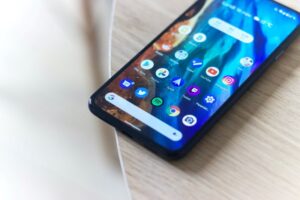
    How to Turn Off Wi-Fi Calling Samsung Phones (Android)
    Through the Phone app:
    1. Open the ‘Phone’ app
    2. Tap the three dots in the top right corner and select ‘Settings’
    3. Select ‘Wi-Fi Calling’ and toggle the switch on or off

    Through the Quick Settings panel:
    1. Swipe down from the top of the screen to reveal the Quick Settings panel
    2. Swipe left to find the Wi-Fi calling icon
    3. Toggle the switch on or off

    How to Turn Off Wi-Fi Calling iPhone Devices

    1. Open ‘Settings’.
    2. Tap ‘Cellular’ and select ‘Wi-Fi Calling’.
    3. Slide the ‘Wi-Fi Calling on This iPhone’ button to green to turn on.

    An Alternative to Wi-Fi Calling for Businesses

    Mobile2CRM helps businesses upgrade their mobile communications system. We provide a range of solutions that eliminate the need for Wi-Fi calling and instead base business communications on cellular-native networks. This allows for higher quality, more reliable business communications between colleagues and customers.

    The business was established with the vision of empowering enterprises to utilize their mobile communication capabilities to increase their customer reach and revenues. Our painless and cost-effective solution ensures that every business call, anywhere, at any time is automatically logged into your own business CRM system.

    Any business calls made by your employees, whether at the office, home or elsewhere, are captured and transferred into the CRM and call recording systems. This enables businesses to effectively monitor and record calls without infringing on the privacy of employees’ personal mobile devices.

    Summary

    In summary, there are many benefits to Wi-Fi calling, including reduced mobile phone bills, flexible coverage and extended device battery life. However, there are also many drawbacks that businesses should be aware of, including decreased reliability, coverage issues and poor call quality. Businesses across the world can benefit from cellular mobile network connections, particularly when integrated with an automated CRM system for recording and tracking business calls.


  • Call Recording Regulation – How It Works at State Level

    Call Recording Regulation – How It Works at State Level

    So you want to learn about call recording? We’re going to explain what the differing state laws mean for gathering consent to record calls and how you can ensure your business is both compliant and efficient in gathering and storing the correct information.

    What is Call Recording?

    Capturing a voice conversation over a phone or virtual call is known as call recording. It is possible to record conversations or conference calls, which can then be saved as a digital file and later transcribed or listened to.

    Why Is Call Recording So Important?

    Call recording has many uses and for a business, it is essential to know exactly what your recordings can be used for and what the regulations are surrounding their use.

    Ignoring call recording regulations can be extremely costly. Whether intentional or not, ignoring privacy laws can have serious consequences. Failure to comply can lead to you being charged or receiving a lawsuit. Of course, state laws vary when it comes to recording calls, but many states can deal out fines and even jail sentences for failed compliance.

    For this reason, it’s important that you understand exactly what can and can’t be recorded and which laws apply in your state and any states that you make calls to.

    Call Recording as Internal Evidence

    Many businesses use call recording for internal evidence. When there are customer complaints or investigations needed, call recordings provide clear evidence of events.

    Storing these files can provide peace of mind for businesses and mean that less general monitoring is needed.

    Call Recording as Legal Evidence

    On top of internal maintenance, recording calls can act as a deterrent to protect the business from lawsuits. Of course, for any call recordings to have any legal impact, they must be recorded with the laws of the state in mind.

    There are many different interpretations of the law when it comes to communication and recordings in different states so it is often recommended to err on the side of caution when it comes to compliance.

    Quality Assurance

    Quality assurance is a big reason why businesses choose to record conversations between employees and customers or suppliers. When an employee knows there are copies of their calls, they are more likely to be conscious of their wording and ensure that any language is representative of the company’s culture and ethos.

    Call Recording and Training

    It is extremely common for businesses to record calls for training purposes. New staff require training and recording calls can allow leadership and trainers to monitor calls and offer advice and input.

    This helps to ensure that the brand’s vision is properly reflected by both new and existing staff members, and it helps sales and support teams find more efficient ways to help customers find a resolution.

    Call Recording by State

    Call Recording by State

    Call Recording Regulations

    US federal law requires at least one party in a call to be notified of the recording. There is a business phone exception to this ruling that allows employers to record calls on phones they provide to employees.

    Notification or consent can be obtained in a couple of ways, and the best method of obtaining permissions might rest on which state you are operating from.

    The FCC outlines the methods through which proper consent can be obtained.

    • Prior written or verbal authorization is obtained before recording.
    • Prior verbal warning before recording is done
    • An audible beep tone that is repeated at regular intervals throughout the call (this is the most common option)

    State Laws on Call Recording

    Both federal and state laws on call recording can be quite complex because of the variety of exceptions and specific legislations that vary from state to state.

    One thing to be aware of is where these legislations actually come into play. In some states, like Maryland, protections only count if you would expect to have a reasonable level of privacy, like in your own home, for example. Privacy laws in public places can be very different.

    Different states also have varying rules on what constitutes consent of an involved party and how that consent can be captured. Some states require consent to be explicitly given, whilst others require just implied consent.

    It is recommended that businesses err on the side of caution when it comes to obtaining consent because of how different federal and state laws can be on the topic. Not only will this give you more legal protection but it can also help to avoid confusion for both employees and customers.

    Recording Interstate Conversations

    What happens if you are in a one-party consent state but the other party is in a two-party consent state? Well, this is where confusion often arises (and why it’s recommended that you take extra caution).

    Typically, the ruling applies to the location of the recording device. This means that if you, as the recorder, are in a one-party consent state then your state laws will apply.

    This gets more complex in places where it’s not clear whether federal or state law applies. Typically, when all parties consent, a recording is legal but the odds of federal law application will go up where there are multiple states with differing state laws involved.

    One-Party Consent or Two-Party Consent?

    We’ve spoken a lot about the differences between one-party and two-party consent states, but what does that mean in practice?

    One-party consent is more popular at a state level but for any business making external calls, it’s important to understand also the laws in other states where the other parties may be located.

    Some states, like Vermont, also haven’t specified state-level laws so are classed as one-party consent states by default because of existing federal laws.

    One-party consent relies on approval from a party involved in a conversation. It is not permitted to record conversations either over the phone or in person that you are not involved in and do not have permission to record. This is wiretapping and can have significant legal repercussions.

    Two Party Consent States

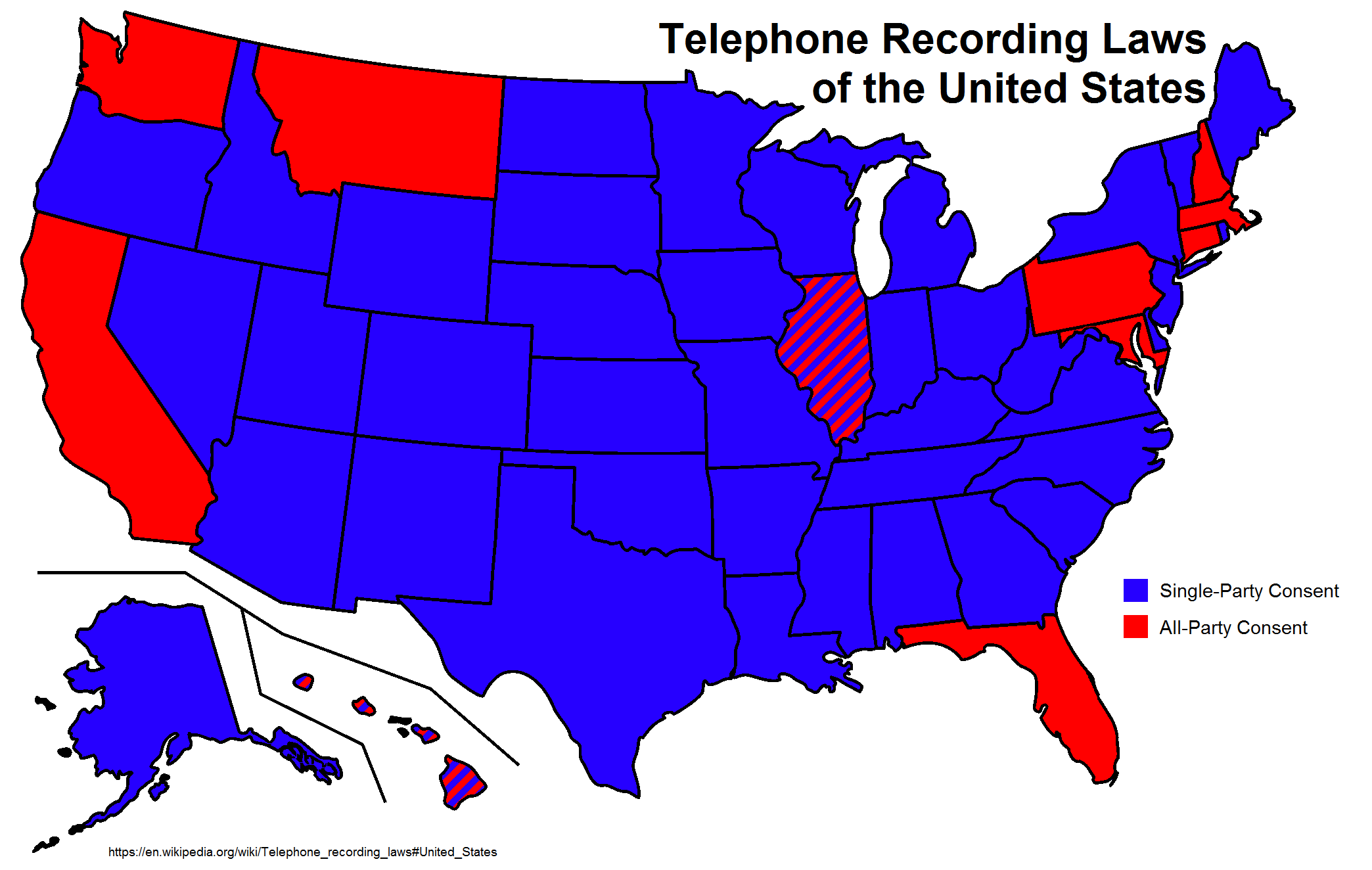
    States that require two-party or all-party consent for recording include:

    • California
    • Connecticut (For electronic recordings)
    • Florida
    • Hawaii (Only requires two-party consent if the recording device is in a private place)[
    • Illinois
    • Maryland
    • Massachusetts
    • Montana
    • New Hampshire
    • Oregon (Two-party consent needed for in-person conversations only)
    • Pennsylvania
    • Washington

    There are some exceptions on this list where laws only apply to specific legal scenarios and not all conversations. It is always best to check on specific scenarios for your state to ensure recordings can be used for their intended purpose if obtained in particular ways.

    One Party Consent States

    Not all states require all-party consent. Here are the states that only require the notification of one party:

    • Alabama
    • Alaska
    • Arizona
    • Arkansas
    • Colorado
    • Connecticut (For in-person conversations)
    • Delaware
    • District of Columbia
    • Georgia
    • Hawaii
    • Idaho
    • Illinois (For electronic conversations or to record law enforcement officers in public places)
    • Indiana
    • Iowa
    • Kansas
    • Kentucky
    • Louisiana
    • Maine
    • Michigan
    • Minnesota
    • Mississippi
    • Missouri
    • Nebraska
    • Nevada
    • New Jersey
    • New Mexico
    • New York
    • North Carolina
    • North Dakota
    • Ohio
    • Oklahoma
    • Oregon (For electronic communication only)
    • Rhode Island
    • South Carolina
    • South Dakota
    • Tennessee
    • Texas
    • Utah
    • Vermont
    • Virginia
    • West Virginia
    • Wisconsin (Must be two-party if it’s to be used for legal purposes)

    Call Recording Solutions for Business

    Of course, for businesses, it is extremely important to adhere to both state and federal laws. When it comes to call recording, the ones you should prioritize are determined by whether you make calls within your own state and whether it is easy to gather consent from your customers.

    Many businesses will gather two-party consent by default. Being overly cautious when it comes to privacy laws can save costly problems and lawsuits and relieve a lot of pressure on both internal teams and leadership.

    There are many solutions that make regulated call monitoring possible and simple for businesses.

    Mobile2crm is a solution that helps businesses tobtain a complete view of interactions with customers without compromising when it comes to privacy. It both complies with regulatory demands and ensures that rulings are clearly followed so that staff can focus on providing great solutions to customers.